
Pocket Lists – Checklists & Reminders4.5.2 - App Store
You'll be able to see results in few seconds.
Publisher Description
Forbes The 9 Best To-Do List Apps For 2014
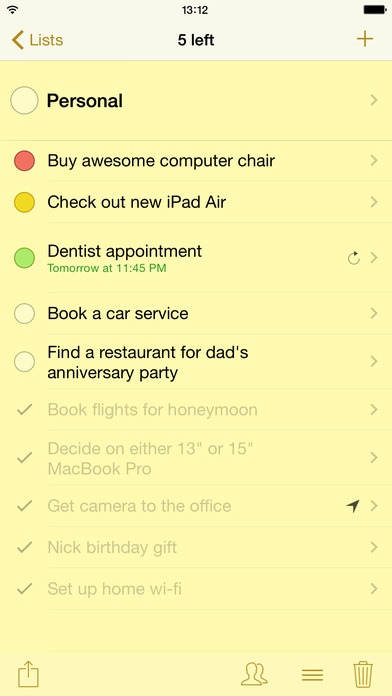
Pocket Lists is a beautifully designed universal app for managing checklists and to-do lists, focusing on important tasks, and collaborating on checklists with your friends. The app excels as both an everyday to-do list organizer with sophisticated reminder functionality, and as a checklist app for groceries, travel packing, Christmas lists, and more.
You ll love Pocket Lists for being powerful yet surprisingly easy to use. The app s feature set makes it a superb replacement for most checklist apps, including the stock Reminders app:
Color-coded checklists with a variety of beautiful icons for all sorts of things. 220+ icons included!
Touch ID support: lock individual checklists with your Touch ID and be confident that no one but you can access your to-do items. Securing your secret checklists has never been easier!
To-do Stream: a dynamic to-do list (filter) that collects to-dos among all your checklists, and displays them in the priority & due order, allowing you to focus on what s important right now.
Apple Watch app: manage your To-Do Stream on your Apple Watch, stay up to date on what's UP NEXT on your To-Do Stream at a glance, receive notifications on upcoming to-dos.
All types of to-do notifications: due date, due time, repeating, and location-based drop pin anywhere on a map, select either arrive to or leave from , and even define a location radius.
Set due reminders by typing naturally: Meeting tomorrow morning , Car service saturday 7pm , Prepare christmas gift list on dec 20 every year , Cinema friday night and so on. The app automatically understands due date from your input, and sets a reminder. Understands all 13 languages the app is localized into! Approved by native speakers.
Pocket Lists Cloud: collaborate on your checklists with other users of the Pocket Lists app, access your checklists via web browser on the app website: http://www.pocketlistsapp.com/cloud/
Pocket Lists Cloud works seamlessly, and is free to use. It is a great way to sync app data between your iOS devices, and to have an always-up-to-date backup of all data.
OCR: Built-in Optical Character Recognition mechanism allows you to create checklists from real photos taken on your iPhone or iPad. Awesome for creating checklists based on what you find in print media, e.g. cookbook recipes. Supported languages: English, German, French, Spanish, Italian, Russian.
Sync with third-party apps and services: Reminders app, Calendar app, Google Tasks, Toodledo.com.
And a lot more:
Priorities, notes for to-do items
To-do item search
To-do hierarchy: swipe to-dos left or right to define hierarchy within a checklist
Passcode-locked checklists
Due and repeating (recurring) options for both to-dos and entire checklists
Quick inline to-do add
Archiving feature for hiding certain checklists
Copy & Paste add of multiple to-dos at a time
Quickly clean up any checklist by shaking your iPhone
Send checklists via email
Duplicate checklists
Sleek app interface feels native to every iOS user
Multiplayer mode for collaborating on your checklists via Wi-Fi or Bluetooth when no Internet connection is available. An exciting way to go shopping with your spouse, or to pack luggage together (supported by the iPhone version only; based on iOS Gamekit engine)!
On-demand backup & restore via iTunes file sharing
Twitter and Facebook integrations
Localized in 13 languages: English, Deutsch, , Italiano, Nederlands, Espa ol, Fran ais, , Portugu s, Dansk, , ,
Requires iOS 8.0 or later. Compatible with iPhone, iPad, and iPod touch.
About Pocket Lists – Checklists & Reminders
The company that develops Pocket Lists – Checklists & Reminders is Vladimir Tuporshin. The latest version released by its developer is 4.5.2.
To install Pocket Lists – Checklists & Reminders on your iOS device, just click the green Continue To App button above to start the installation process. The app is listed on our website since 2011-12-01 and was downloaded 0 times. We have already checked if the download link is safe, however for your own protection we recommend that you scan the downloaded app with your antivirus. Your antivirus may detect the Pocket Lists – Checklists & Reminders as malware if the download link is broken.
How to install Pocket Lists – Checklists & Reminders on your iOS device:
- Click on the Continue To App button on our website. This will redirect you to the App Store.
- Once the Pocket Lists – Checklists & Reminders is shown in the iTunes listing of your iOS device, you can start its download and installation. Tap on the GET button to the right of the app to start downloading it.
- If you are not logged-in the iOS appstore app, you'll be prompted for your your Apple ID and/or password.
- After Pocket Lists – Checklists & Reminders is downloaded, you'll see an INSTALL button to the right. Tap on it to start the actual installation of the iOS app.
- Once installation is finished you can tap on the OPEN button to start it. Its icon will also be added to your device home screen.
Program Details
System requirements
Download information
Pricing
Version History
version 4.5.2
posted on 2011-12-01
Disclaimer
Official App Store Link
We do not host Pocket Lists – Checklists & Reminders on our servers. We did not scan it for viruses, adware, spyware or other type of malware. This app is hosted by Apple and passed their terms and conditions to be listed there. We recommend caution when installing it.
The App Store link for Pocket Lists – Checklists & Reminders is provided to you by apps112.com without any warranties, representations or guarantees of any kind, so access it at your own risk.
If you have questions regarding this particular app contact the publisher directly. For questions about the functionalities of apps112.com contact us.
